Tools Turn a Chatbot Into an Actor
evergreen11 July 20266 minAI
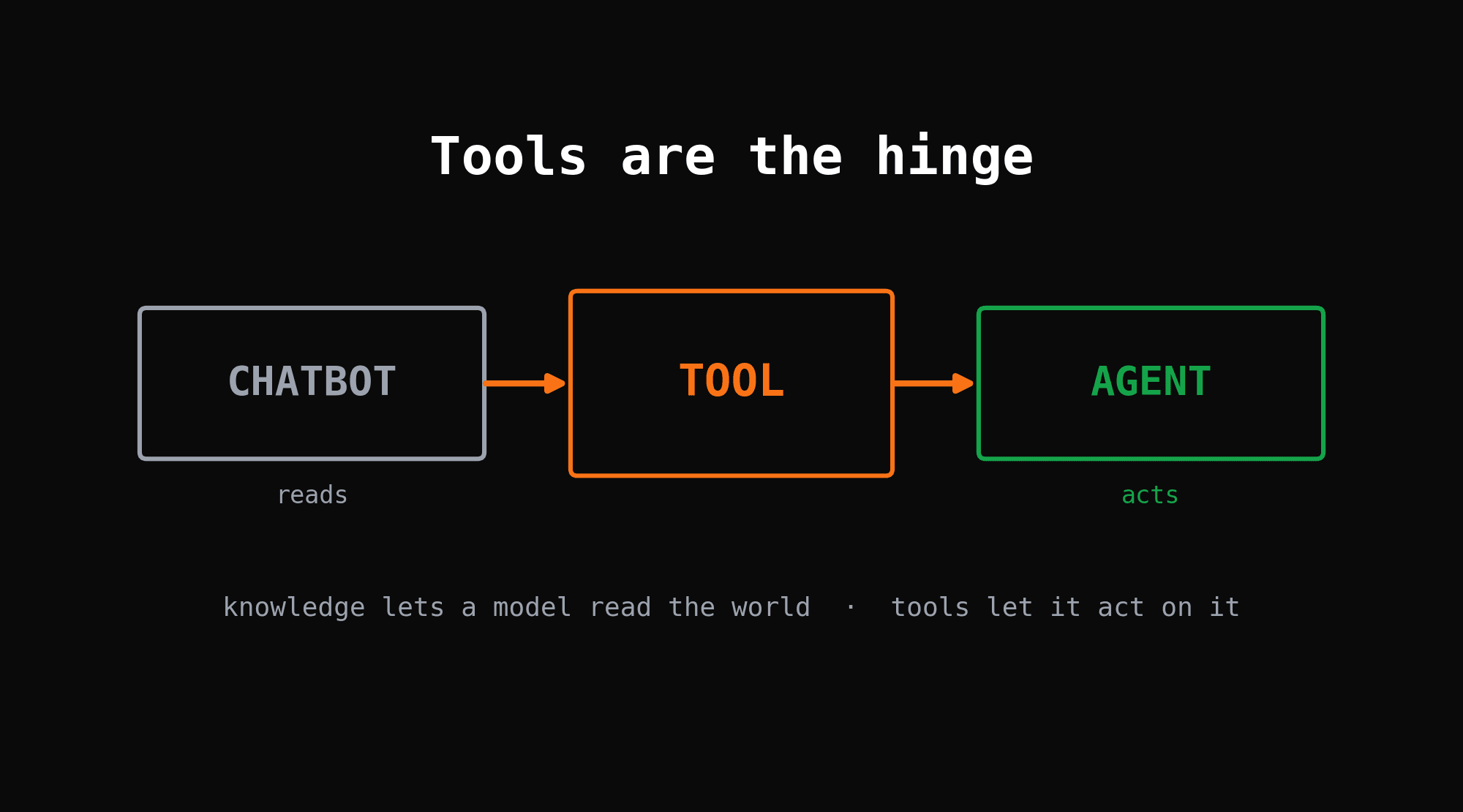
A chatbot answers. An agent acts. The one thing standing between them is a tool.
Everything earlier in this ladder made the model smarter about words. Prompts shaped what it said. Retrieval let it read your data. But a model that can only read is still trapped inside the conversation. Give it and it reaches out of the box: it books the flight, runs the query, sends the email. Knowledge lets a model read the world. Tools let it act on it. That is the hinge between chatbot and agent, and this post is about giving models tools without the mess.
A Tool Is a Function With a Description
You already have the function. get_weather(city), search_orders(customer_id), send_email(to, body). The model cannot run your code, and you would not want it to. What it can do is ask.
To let it ask, you hand the model a : the function's name, one line on what it does, and the shape of its arguments as JSON Schema. That is all. The model never sees your implementation. It sees a menu. (also called ) is the model reading that menu and replying, in structured JSON, "call get_weather with city: Berlin." Your code runs the real function. The model only requested it. If you want the mechanics under this, it grows straight out of structured outputs and function calling.
This is why the description matters more than the code. The model picks tools by their descriptions, the way you pick a dish by its menu line. Vague line, wrong order.
The Call, Result, Continue Loop
One tool call is not an agent. The loop is.
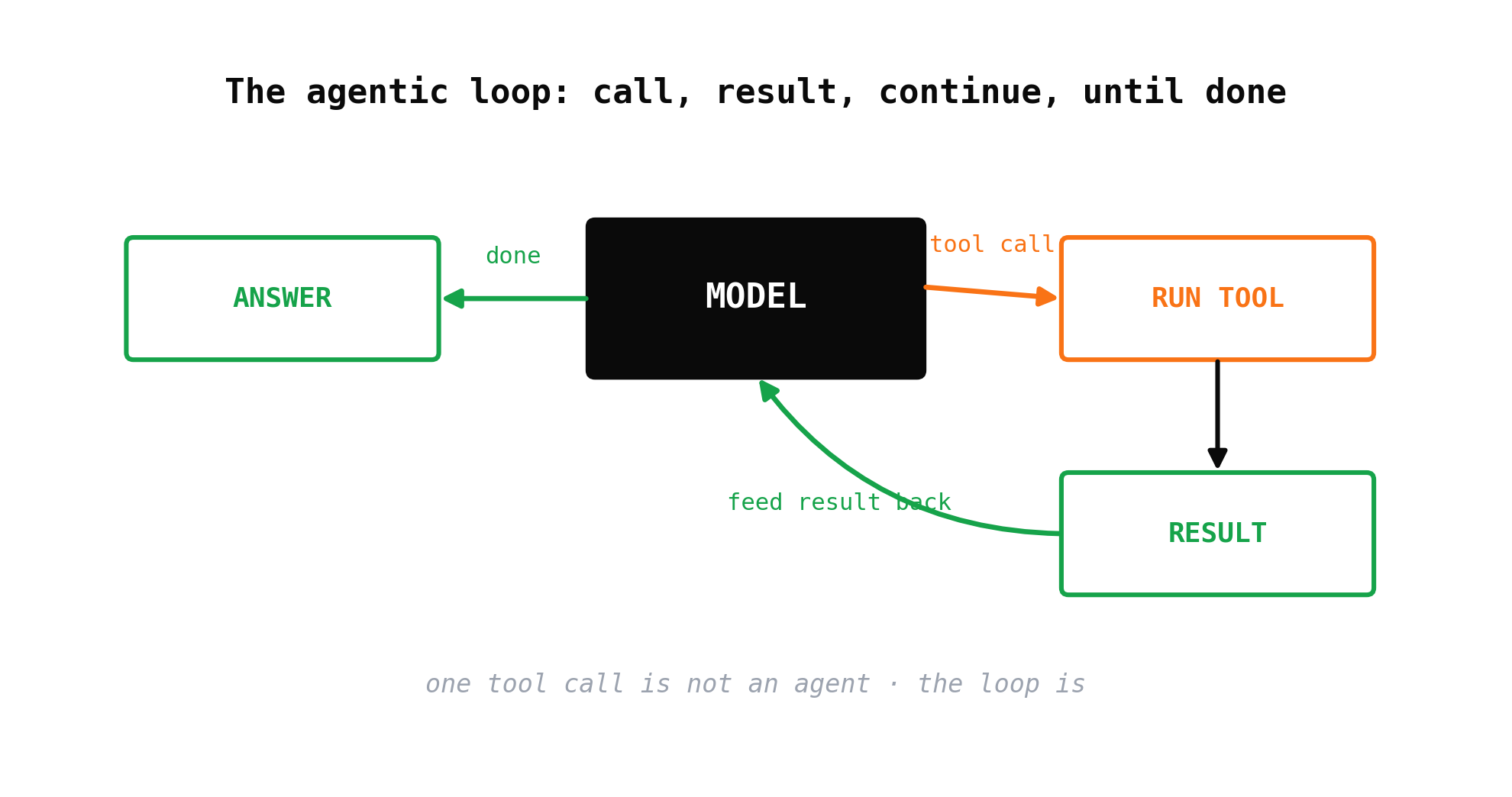
The model reads the request and the tool menu. It either answers directly or emits a tool call. Your runtime runs that tool, captures the result, and appends it to the conversation. Then it calls the model again with the result in hand. The model looks at what came back and decides: call another tool, or finish. It repeats until it has enough to answer.
That is . Nothing more mystical than a while-loop with a model inside it. Everything left in this series, memory, planning, safety, evaluation, is a refinement of this one loop.
Choosing and Ordering the Calls
Give a model three tools and it usually picks well. Give it fifty and it starts reaching for the wrong one. is the model deciding which tool fits the step it is on. You improve it the boring way: sharp descriptions, few tools, clear names.
When one model juggling every tool stops working, you add a layer. sends the request to the right group first, then exposes only that group's tools. A is a cheap classifier, often a smaller model, that reads the request and decides "this is a billing question, load the billing tools." The main model then chooses among five tools instead of fifty.
Some calls are independent. Fetch the weather in three cities and no call needs another's answer. Fire them as and wait once. Other calls form a chain: look up the user, then use their ID to fetch their orders. Those are , ordered because each one feeds the next. Knowing which is which is most of writing a fast agent.
Managing Many Tools
Ten tools you can hand-wire. A hundred you cannot. A is the catalogue: every tool, its schema, and its handler, in one place the agent reads from at runtime. Add a tool to the registry and the agent can use it without you touching the loop. This is where lives: one agent driving many external services, Stripe, GitHub, your database, through a single uniform set of tool definitions. The repeatable ways you wrap each service, its auth, its pagination, its error shapes, into that uniform surface are your . Reuse them and the fiftieth tool costs about what the fifth did instead of a fresh integration every time.
Which raises the problem the next standard was built to kill.
MCP Ends the Bespoke Glue
Before, every tool was custom glue. Wire GitHub into your agent, then wire it again for the next agent, in a different framework, with a different tool format. N agents times M tools is N times M integrations, all bespoke, all breaking on their own schedule.
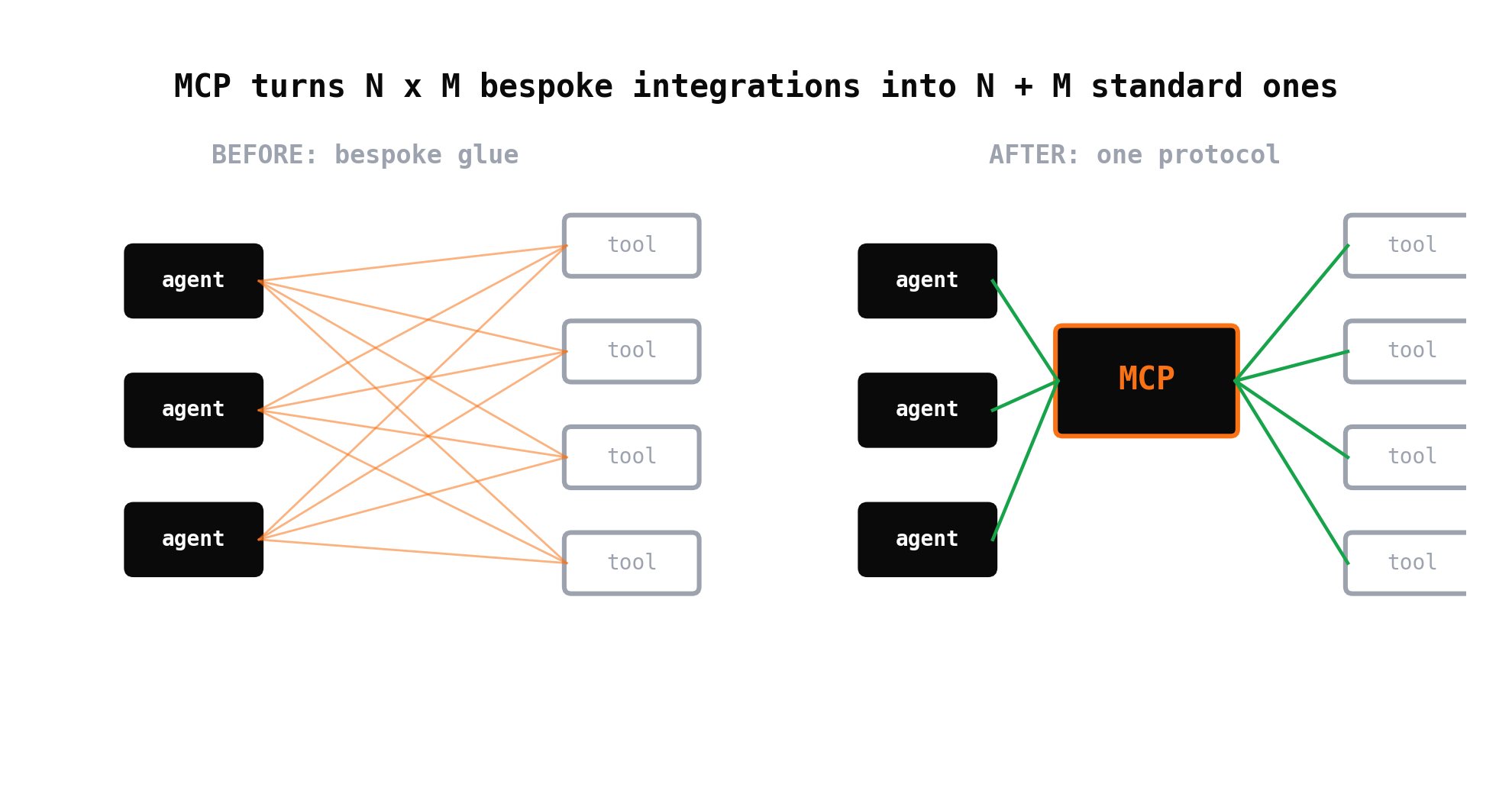
is the fix: one open standard for how a model and a tool talk. A tool exposes itself once, in the MCP format. Any MCP-speaking agent can use it. N plus M integrations instead of N times M. Think of it as USB for tools: a universal plug so a model and a capability stop needing a hand-built adapter for every pairing.
Server, Client, Host
MCP names three parts. An wraps a capability, your files, a database, an API, and exposes its tools in the standard format. The is the piece inside your app that speaks the protocol to one server. The is the application the user actually runs, a desktop assistant, your agent, an IDE, that holds the clients and the model together.
The point is discovery. The host connects to a server it did not ship with, asks "what can you do," and gets back a list of tools it can call immediately. The tools these servers wrap are the : the concrete links to files, SaaS APIs, and databases that give the model real reach into systems you never coded against directly. Because MCP standardises the here, connecting a database looks the same as connecting a file store, instead of a bespoke job each time.
Where A2A Sits
MCP connects an agent to its tools. It says nothing about two agents talking to each other. That gap is : a separate protocol for agents to delegate to and coordinate with other agents as peers. The rule of thumb is short. MCP is how an agent uses a tool. A2A is how an agent talks to another agent. You will not need A2A until you have more than one agent, which is a later level's problem, not this one.
The Loop Is the Whole Move
Go back to the opening. A chatbot answers because words are all it has. An agent acts because you handed it tools and wrapped the handing in a loop. Everything above, schemas, routing, registries, MCP, is plumbing around that one move. Give the model a way to reach out of the conversation, and it stops describing the work and starts doing it.
One tool call is a trick. Wrapping that loop in a goal, giving it memory and a plan and a reason to stop, is what turns the loop into an agent. That is the next rung.