What Models Take In
evergreen29 July 20266 minAI
Everything so far in this course has been about text. You send text, the model scores the next token, you get text back. That was true and it is no longer the whole picture, because the models you will build on now take images and audio too.
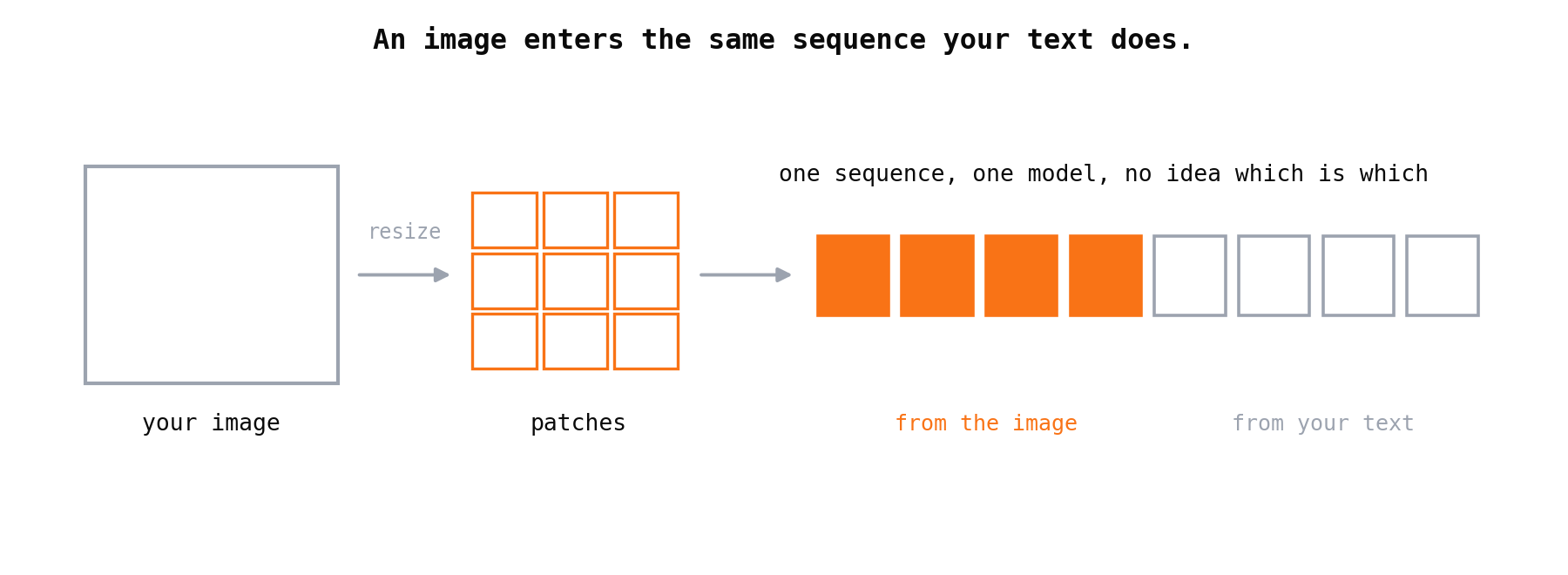
The word for this is , and it is usually explained as if the model gained a new sense. It did not. A vision model does not look at your picture. It receives your picture converted into the same kind of tokens your text became, in the same stream, and predicts the next one exactly as before. There is still one mechanism.
That single fact explains every practical thing you need: why images cost money, why small print disappears, and why the best tool for a scanned document is often not vision at all.
In short: An image is resized, cut into patches, and each patch becomes tokens that join your text in one sequence. So images are priced like text, detail below patch size is lost before the model sees it, and OCR still beats native vision whenever you need exact text at volume.
An Image Becomes Tokens Too
Take the loop from How a Language Model Works. Text becomes tokens, tokens become vectors, the model predicts the next one. Vision changes only the front door.
Your image is resized to a size the model expects, then cut into a grid of small squares called . Each patch is turned into a vector, the same shape of thing a text token becomes. Those vectors are placed in the sequence alongside your text. From there the model has no idea which vectors came from letters and which came from pixels. It is one stream.
Audio works the same way in spirit. The waveform is turned into a representation that becomes tokens in the sequence. Different front door, same corridor.
This is why "can the model see" is the wrong question. The right question is what got into the sequence, and at what resolution.
Three Consequences You Will Meet In Week One
Everything practical falls out of the paragraph above. There are three, and they cover most of what goes wrong.
Images cost tokens, so they cost money. Patches become tokens, and tokens are what you pay for. A large image can cost more than the entire conversation wrapped around it. Send ten screenshots into an agent loop and the bill is not a rounding error, it is the bill. Resolution is a budget decision, not a quality slider.
Detail below patch size is gone before the model arrives. Your 4000 pixel scan is downscaled first. Small print, thin table rules, a faint stamp: if it did not survive the resize, no prompt recovers it. The fix is not a better instruction, it is a better input. Crop to the region that matters and send that, or send the page in sections.
Position is fuzzy in a way text is not. The model can tell you what is in an image far more reliably than exactly where, or in what order across a complex layout. Asking for the third row of a table by counting rows is asking the wrong thing of the sequence.
OCR or Native Vision: Pick By What You Need Back
Here is the decision that actually comes up, and the answer is not "use the newest thing."
runs a dedicated model whose only job is turning pixels into characters. You get text: exact, deterministic, cheap, diffable, and reprocessable a year later without paying again. puts the image into the model and lets it reason over the whole page at once, layout included.
I hit this building document extraction for a CV tool. A CV arrives as a PDF, a Word file, or a photo somebody took at an angle, and the job is to pull out real fields. Native vision handles the messy photo impressively, and it is the wrong default, because what the rest of the system needs is text it can store, search, re-run and audit. So the pipeline runs extraction to text first, and vision earns its place only where the layout itself carries meaning that flat text destroys.
| Use OCR when | Use native vision when |
|---|---|
| You need exact text you can verify and store | Layout, columns or tables carry the meaning |
| Volume is high and cost per page matters | The question is about the image, not the words in it |
| The output feeds search, diffing or reprocessing | There is no text, such as a chart, a photo, a diagram |
| You need the same answer every time | The document is messy enough that character recognition fails |
The two are not rivals. The strongest pipeline usually runs OCR for the text and reaches for vision on the pages where flat text loses something.
When Multimodal Is the Wrong Tool Entirely
Worth saying plainly, because the capability is new enough to be exciting. If the data already exists as structured text, sending a picture of it is strictly worse. A screenshot of a table is a worse input than the table. A photo of a receipt is a worse input than the receipt's data.
The pattern to watch for is a pipeline that renders something to an image and then asks a model to read it back. Somewhere upstream, that information was structured, and someone threw the structure away. Fix the upstream step. Vision is for when the image is the only thing you have, or the layout is the message.
One Stream, Two Doors
Go back to the opening. A multimodal model has not gained a sense. It gained a second way to fill the same sequence, and every practical rule follows from that: images are priced like text because they become text-shaped things, detail vanishes at the door rather than inside the model, and a tool built for characters still beats a general model when characters are what you need.
Which is a useful habit for the rest of this course. When a capability sounds new, ask what it puts into the sequence. The answer is usually less magical and far more actionable than the announcement.
Next we look at models that spend more compute before answering, and whether the extra thinking is worth what it costs.