Enterprise Media Processing & Migration Platform
A Video Transcoding and Secure Streaming Pipeline
A video platform needed to take raw uploads and serve them as smooth, adaptive streams that only authorized viewers could watch. I built a serverless pipeline on AWS: an upload lands in storage, a function kicks off a transcode into adaptive streaming format, and the result is delivered through short-lived signed links behind a content delivery network. I also migrated the platform's existing back-catalogue through the same pipeline.
The problem
A raw video file is not something you can stream well. It is one big file at one quality, so a viewer on a weak connection buffers and a viewer on a fast one gets less than they could. Streaming needs the video cut into small segments at several quality levels, so the player can switch on the fly. And the platform's videos were not meant to be freely downloadable, so a plain public link would not do. The platform needed a safe way for users to upload, an automatic way to convert each upload into an adaptive stream, and a way to deliver that stream so only an authorized viewer, for a limited time, could play it. On top of that, a large library of existing videos had to be brought through the same conversion.
Constraints
- ·Adaptive streaming: output had to be segmented, multi-quality streaming format, not a single downloadable file.
- ·Access-controlled delivery: videos could not be public, so playback had to be limited to authorized viewers for a limited time.
- ·Serverless and automatic: a new upload should convert itself, with no server to babysit.
- ·A back-catalogue to migrate: an existing library of videos had to run through the same pipeline in bulk.
Architecture
A serverless pipeline. The app requests a short-lived S3 presigned URL and the user's video uploads directly to a source bucket. The upload raises an S3 event that runs a Lambda, which submits an AWS MediaConvert job to transcode the video into HLS (multi-bitrate adaptive streaming) in an output bucket. CloudFront sits in front of the output, and playback uses signed URLs minted with an RSA key from AWS Secrets Manager. Cognito gates the API. A separate bulk path migrates the existing library through the same MediaConvert transcode using chunked file lists.
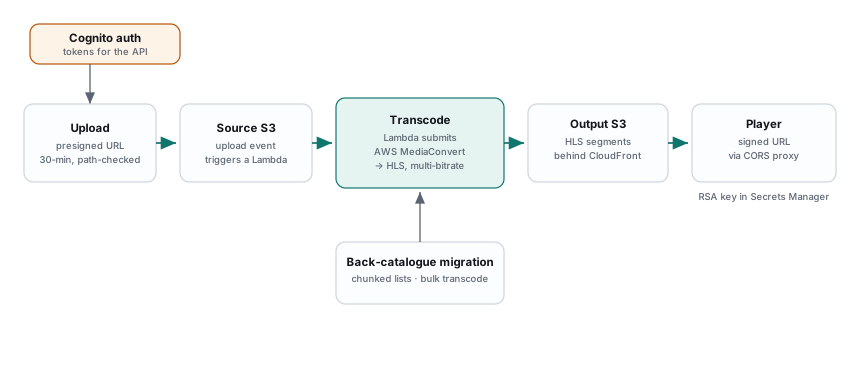
- ›Presigned upload Lambda: short-lived S3 upload URL, filename checked for path traversal
- ›S3-event Lambda: on upload, submits an AWS MediaConvert job (HLS, multi-bitrate)
- ›Bulk transcode Lambda: lists the source bucket and submits jobs in batches
- ›Back-catalogue migration: reads chunked file lists and bulk-submits MediaConvert jobs, with a validation step
- ›CloudFront signed-URL Lambda: RSA key from Secrets Manager, SHA-1 + PKCS1v15 signing, time-limited URLs
- ›Cognito: user tokens and password updates for the API
- ›Web: an HLS player and a small Node proxy that adds CORS for cross-origin playback
How one request flows
- 01Upload safely: the app asks for a short-lived, single-purpose upload link, and the user's video lands directly in a storage bucket. The link expires and the filename is checked.
- 02The upload triggers a transcode: the new file raises a storage event that runs a function, which hands the job to AWS MediaConvert rather than transcoding itself.
- 03Convert to an adaptive stream: MediaConvert cuts the video into short segments at several quality levels (HLS) and writes them to an output bucket.
- 04Deliver through signed links: the stream sits behind a content delivery network, and the app mints a signed link valid only for a short window, signed with a private key kept in a secrets store.
- 05Play in the browser: a small player loads the stream, with a lightweight proxy that adds the cross-origin headers a browser needs to fetch the segments.
Engineering decisions
Let a managed service do the transcoding
What. The function submits a job to AWS MediaConvert instead of running encoders.
Why. Transcoding is heavy, and running my own encoders would mean managing servers, queues, and scaling.
Tradeoff. Less control over the encoder internals, taken gladly, because for a serverless pipeline not owning a fleet of encoders is the point.
Adaptive streaming, not a download
What. The transcode produces HLS, the video cut into short segments at multiple bitrates.
Why. A single file streams badly, and adaptive lets the player pick the quality that fits the connection and switch as it changes.
Tradeoff. More output files to manage per video, the cost of smooth playback.
Playback you have to be allowed to do
What. Delivery goes through CloudFront with signed URLs, signed by a private key held in Secrets Manager.
Why. The videos are not public, and a signed, expiring URL is a fresh time-limited grant rather than one link that leaks forever.
Tradeoff. The app must mint a signed URL for every playback, a small cost for real access control.
Two ways in: new uploads and the old library
What. New uploads convert via the S3 event, and the existing library is brought through a bulk migration over chunked lists.
Why. Thousands of files already in storage cannot wait on upload events.
Tradeoff. Two code paths to maintain, justified by the one-off scale of the back-catalogue.
What changed along the way
- →Started with an event-driven transcode for single uploads, then added a bulk path to bring the existing library through.
- →Built a second iteration of the transcode functions to refine the job settings, keeping the first, complete set as the working version.
- →Added the browser proxy once it was clear the player could not fetch the stream cross-origin on its own.
Security and reliability
- ·Signed, expiring access: playback needs a freshly signed link that expires, so a link cannot be shared forever.
- ·Keys in a secrets store: the signing key lives in AWS Secrets Manager, not in the code.
- ·Safe uploads: upload links are short-lived and single-purpose, and filenames are checked to block path traversal.
- ·Authentication: the app's API is gated by Cognito tokens.
- ·Serverless: no servers to patch or scale, the pipeline runs on managed functions and services.
Metrics
What shipped
- ✓Built a serverless pipeline that converts each upload into an adaptive HLS stream on its own.
- ✓Delivered videos through CloudFront with short-lived signed links, so playback is access-controlled.
- ✓Migrated the existing video library through the same transcode in bulk, with a validation step.
- ✓Kept the signing key in a secrets store and gated the API with Cognito.
- ✓Shipped a browser player with a proxy so the streams play cross-origin.
Lessons learned
- ·For video, hand the transcoding to a managed service. Owning encoders is a job in itself.
- ·Adaptive streaming is what makes video feel smooth, and it is a transcode setting, not an afterthought.
- ·Signed, expiring links beat private links, because access is granted fresh each time.
- ·New and existing content need different paths in: an event for uploads, a bulk job for the back-catalogue.